
Smart Garage Door Opener with Camera Installation and Fixing
A smart garage door opener with camera does 2 things at the same time. It opens and closes the door and shows you what’s going on in the garage as it does. Once the two jobs are running you stop worrying if you left the door up. When one of them goes down, you’re locked out of your own footage, or worse, locked out of your own garage. Century Garage Door Service installs openers with cameras, installs smart control on openers that still have good years left in them and repairs the ones that have stopped talking to the app.
- New installations, retrofits and repairs on LiftMaster, Chamberlain, Genie, Craftsman and Overhead Door units
- Wi-Fi, app pairing and camera setup completed and tested before leaving
- Simple answers to whether your current opener is worth keeping
Century Garage Door Service – 120 NW 25th St Suite 204, Miami, FL 33127
Request an Estimate
We’ll get back to you within 15 minutes.
Who Really Comes To Your House
Look for garage door help, and most of what you see is a lead broker. You call, you give your information, and that information is sold to whoever is buying that zip code that week. You never know who’s coming until the van shows up. Century Garage Door Service is not that. We take the call, we schedule the work and the technician that comes out works for us.
The process is deliberately short. You tell us what the door and opener are doing or not doing. We ask a few questions to narrow it down before anyone drives out, because the difference between a camera that lost its Wi-Fi handshake and a logic board that’s quit matters for what we bring. The technician will come to your location and test the opener under load, check the door balance, check the safety reversal and then talk to you about parts. Diagnosis and price before any work is performed.
Our vans are loaded for opener work, not just doors. That includes current LiftMaster and Chamberlain smart drives, add-on smart garage control modules for older openers, replacement logic boards and travel modules, safety sensors, remotes, keypads, rail and gear kits and the network tools to troubleshoot a weak signal at the ceiling. Having the right parts the first time is the difference between getting the job done and a second visit.
What The Work Is Like
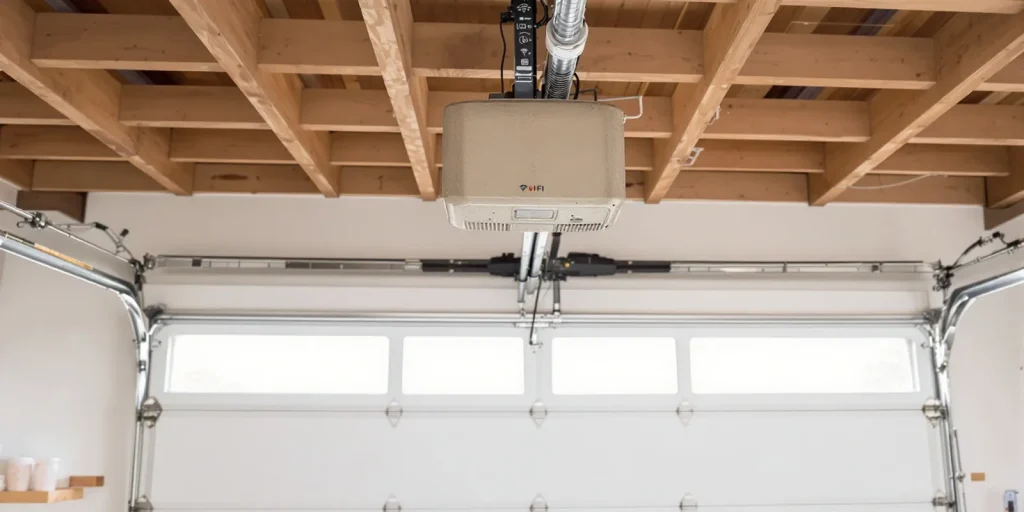
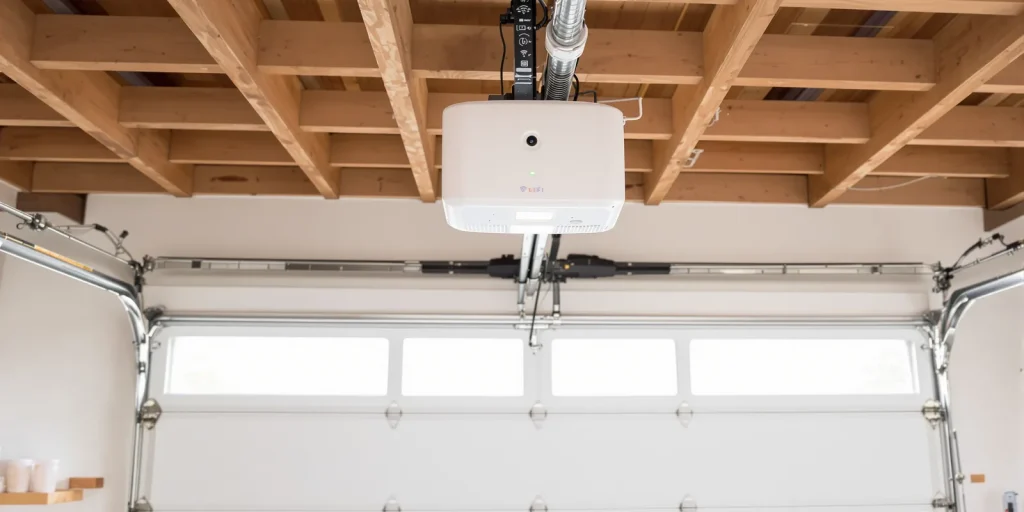
Same garage, same height of rails. The old unit didn’t have any network hardware at all, so smart control meant a new head unit. The camera in the replacement covers the parking bay and the side door and the homeowner watched the first test open from the app while standing next to us.
Smart Garage Door Openers: What Goes Wrong and What We Do About It
Almost every call we get about a smart garage door opener starts the same way: “it worked fine and now the app won’t do anything.” That one symptom has four or five very different causes underneath it, and they’re not equal in expense. This is how we work them out.
Camera's going offline again
The open and close command is much more tolerant of a weak signal than a camera that streams all the time. The router that reaches to the ceiling of an attached garage might not be able to reach through a firewall, a masonry wall or an insulated door. We check the signal strength directly at the opener head, not your phone, check to see if the unit is on a 2.4 GHz band, and check to see if the network name changed after a router swap. If the signal really isn’t there, the fix is a mesh node or an access point in range of the head, not a new opener.
Garage door app does nothing, but wall button works
This one is typically good news. If the wall control opens the door, the motor, the gear and the rail are all good. The problem is on the network side of the unit. Typical causes include a unit that remains registered to a former homeowner’s account, an app account that has lost its device link following an update, a Wi-Fi module that has failed while the rest of the opener is healthy, or a LiftMaster myQ garage door opener that needs to be cleared and re-enrolled. We re-pair it. If the module is dead we replace that board instead of the whole opener.
The opener has zero smart features
There are a ton of openers from the 2000s and 2010s that are mechanically sound and will never be smart on their own. There are two honest routes. The Wi-Fi garage door controller works with your existing wall button terminals and provides app control and status for the opener you already have, with the option to add a separate camera nearby. Or you replace the head with a modern Wi-Fi garage door opener that has the camera built into it. We’ll tell you which one your unit is a candidate for. Openers made before about 1993 have no rolling code security and should be replaced no matter what you want to do with the app.
Grinding, slipping or a door that won't open all the way
When the smart features are the least of the trouble, we say so. A worn trolley, a bad capacitor, stripped drive gears, a logic board that has lost its travel limits, safety sensors knocked out of true – these things all create symptoms blamed on the app. And a door that stops halfway is often not a fault of the opener at all. It is a spring out of tension and it has left the opener lifting weight it was never rated to lift. That is exactly why we check door balance on every opener call.
Retrofit Or Replace? Which One Is Right For You?
There is no universal answer to this and anyone who gives you one on the phone without asking the age of your unit is guessing. What it boils down to is the condition of the motor and gear, if the opener has rolling code security and if you want the camera integrated or separate.
Add Smart Control To Your Existing Opener
-
The best kind is when the opener goes quietly, lifts easily, and is under twelve years old.
-
Wireless garage door opener controller connects to existing wall button terminals, no rail work needed
-
Open, close and status alerts you receive on your phone via the manufacturer's app
-
A camera can be mounted separately and placed where the view is really useful
-
Most affordable way into a smart garage, reversible if you later upgrade the opener
Switch To A Smart Garage Door Opener With Camera
-
This is best if the unit is old, noisy, pre-rolling-code, or you want to have one device and one app instead of two.
-
One fully integrated unit: camera, motor, Wi-Fi and app control all with a single warranty
-
Current models feature modern rolling code security, quieter belt drive and battery backup
-
LiftMaster and Chamberlain camera-equipped lines include two-way audio and motion-triggered clips
-
Old head, rail and dead remotes removed and taken away during install
5 Things To Try Yourself Before You Call
The only thing about garage door work that is actually safe for a homeowner to mess with is the connectivity issues, because none of that involves the stored energy in the door. Go through them in order. If the door is behaving itself but the app is not, chances are one of these will fix it.
-
1
Make sure you’re on the right Wi-Fi band
Almost all smart garage openers on the market connect on 2.4 GHz only. If your router has one network name for both bands your phone may be on 5 GHz during setup and the pairing will fail with no good error. Temporarily split the bands or force 2.4 GHz network during enrollment in your router app.
-
2
Check signal where the opener actually is
Look at the bars on your phone and stand under the opener head, not in the doorway. One or two bars are enough to send an open command, but not enough to hold a camera stream. Most “the camera is offline again” complaints are due to that one test.
-
3
Power cycle in the correct order
Unplug the opener from the ceiling outlet. Reboot the router and wait for it to fully come back up. Then reconnect the opener and let it rejoin for two full minutes. This is often why when people try this it does not work, because they are rebooting them in the other order.
-
4
Remove the device from the app and add it again
A stale device registration after changing a router, changing an account email, or buying a home is very common. Completely delete the opener from your account and run the add-device flow fresh. If the unit came with the house it may be registered to the previous owner and will need to be released before your account can take it
-
5
Clean lens and check camera storage settings
The garages are dusty, the lens face down. More “broken” cameras than you would expect can be resurrected with a swipe from a microfiber cloth. If you are in the app check to see if local storage is full or a subscription for cloud clips has lapsed, both make a working camera look dead.
Stop here. Don't go further than the app and the power cord.
Do not un-bolt the head of the opener, do not disconnect the rail and do not touch the springs, cables or brackets on the door itself. Torsion springs contain sufficient energy to cause serious injury or worse. They release without warning when disturbed. If the door is off the track, a cable has come off a drum or a spring is visibly separated, only pull the emergency release if the door is fully closed, keep everyone away from it and call us. This is not a liability waiver. That's the part of this trade that will land people in the emergency room.
How to pick who works on your garage door opener
The first thing to find out is if you are talking to a company or a call center. Ask who the technician is employed by. A dispatcher who cannot tell you that is selling your phone number, and the price you were quoted has nothing to do with the price you will be given at the end.
The second is whether they will diagnose before they quote. Opener symptoms overlap badly. A reversing door could be: dirty sensor lens, misaligned sensor, travel limit that drifted, or door that has become heavy because a spring is failing. Those 4 repairs are not close in price. Anyone who quotes a full opener replacement over the phone, prior to seeing the unit, has made up their mind what you are buying before they know what is wrong.
So before you agree to anything, ask them two questions. Will you tell me exactly what part is broken and show it to me? And is the price you just gave me the price on the invoice, with the service call?
Frequently Asked Questions
Can I put a camera on the garage door opener I already have?
Yes, in two ways. If you add a stand-alone camera with a smart garage control module to manage the open and close commands, you can keep your existing opener in service. Or you can swap the head for a unit with the camera built in. The integrated route gives you one application and one point of support. The add-on route is cheaper and lets you put the camera where the view is best, which is not always right above the door.
Does a Bluetooth garage door opener work as well as a Wi-Fi one?
In range only. A Bluetooth garage door opener connection works when you are in or near the driveway which is fine for hands free arrival but useless for checking the door from your office. You need Wi-Fi if you want anything to do with remote status, alerts or a live camera feed. Some units use Bluetooth for the initial handshake when setting up, and then run on Wi-Fi from then on, which is why people sometimes think they have a Bluetooth opener when they don’t.
Why did my smart garage door opener stop working when I changed internet providers?
Because the opener is still looking for a network name and password that no longer exists. It has no screen to tell you that. It just shows up as dead in the app. To fix this, you need to unenroll the device from your account and then re-enroll it on the new network. If the new router is just broadcasting a combined network name, you may need to separate the 2.4 GHz band before the opener will see it.
How long do garage door openers last?
The motor and drive will be 10 to 15 years, and that number will vary depending on how many cycles the door sees. A two car household that opens and closes four to six times a day will wear an opener out much faster than a household that uses it twice a day. Smart and camera components are electronics and tend to be the first thing that dates the unit. This is why a retrofit module is often the smarter money on a mechanically healthy opener.
My door opens a foot, and stops. Is that the door or the opener?
The door more often. The door is a lot heavier with a broken spring. The force settings in the opener reduce the power to protect the motor. It’s not a good idea to crank up the force settings to compensate. It removes the safety limit that’s trying to tell you something is wrong and puts a straining motor on a door that can fall. Have the balance checked. Try it yourself. Pull the emergency release with the door closed and lift it manually. A balanced door will stay about half way, a heavy door will drop.
Repair Your Smart Garage Door Opener
Whether you’re installing a smart garage door opener with camera for the first time, adding app control to a working opener, or trying to figure out why an opener that used to work has gone silent, one phone call gets you a technician who’ll take a look at the actual hardware and tell you what it needs.
Century Garage Door Service – real techs, diagnosed on site, price before the job begins.
Related Services For Garage Door
Garage Door Opener Service
LiftMaster, Genie, Chamberlain, Craftsman and Overhead Door units: gears, logic boards, capacitors, travel limits and safety sensors.
Garage Door Spring Replacement
Broken torsion and extension springs replaced in matched sets. Door balance reset so your opener is not carrying the load.
Garage Door Remote and Keypad Programming
New remotes, exterior keypads and in-car button programming including clearing codes left behind by a previous owner.